HyperAgent

iSCSI vs. NFS – which one is better choice for Instant VM?

iSCSI vs. NFS – which one is better choice for Instant VM?

Occasionally I come across a discussion about which approach is better to serve backup data to an Instant VM – iSCSI or NFS, or any others?

Those who advocate NFS quite often say that if the target hypervisor supports NFS storage and the vendor has done a good job providing backup data as NFS storage – there is no difference.

From a user perspective, both approaches give the same VM as a result; with the same potential bottlenecks such as CPU, RAM, bandwidth etc.

Citrix, RedHat Virtualisation, KVM, MS Hyper-V, VMware ESXi – all of them can work with NFS storage today.

Why do some vendors stick to NFS while others offer iSCSI?

NFS (Network File System) has been around since 1984 and was originally developed by Sun Microsystems as a distributed file system protocol.

iSCSI (Internet Small Computer Systems Interface) was born in 2003 to provide block-level access to storage devices by carrying SCSI commands over a TCP/IP network.

“Block-level access to storage” is the one we are after, the one we need to serve to an Instant VM (a VM which runs directly from a data set, in our case directly from backup).

“SCSI commands over a TCP/IP network” – yeah, this is exactly what we need!

Anyone developing an “Instant-VM” solution between 1984 and 2003 really had no choice but to employ an NFS protocol.

VMware is probably the best but not the only example.

In other words, the sooner an “Instant-VM” had emerged – the greater the likelihood that this solution would be based on NFS.

So, NFS is not a real advantage, but rather an indication of when the decision had been made.

iSCSI has broader coverage across hypervisors and has in fact been one of the firm standard means to provide storage devices for VMs; reaching the widest variety of systems as possible with the best API support.

Taking the iSCSI approach means less hassle in the long run.

For others, maintaining the NFS approach may mean increasing investment in development with time or switching to iSCSI to stay relevant to targeted environments.

iSCSI protocol remains actively maintained/enhanced/enforced by standards, while NFS went off focus a while ago due to a lack of in-demand features in areas where it shined earlier such as distributed file system.

Some of iSCSI’s clear advantages over NFS and others:

1. It is supported in almost every hypervisor and OS out there today.

2. Mature technology with clear up-to-date standards

3. Works across the network very well, even in relatively high latency/low bandwidth scenarios

4. Great performance.

5. Removes reliance on kernel drivers

6. For a vendor employing iSCSI approach it often means one component to serve all products needs
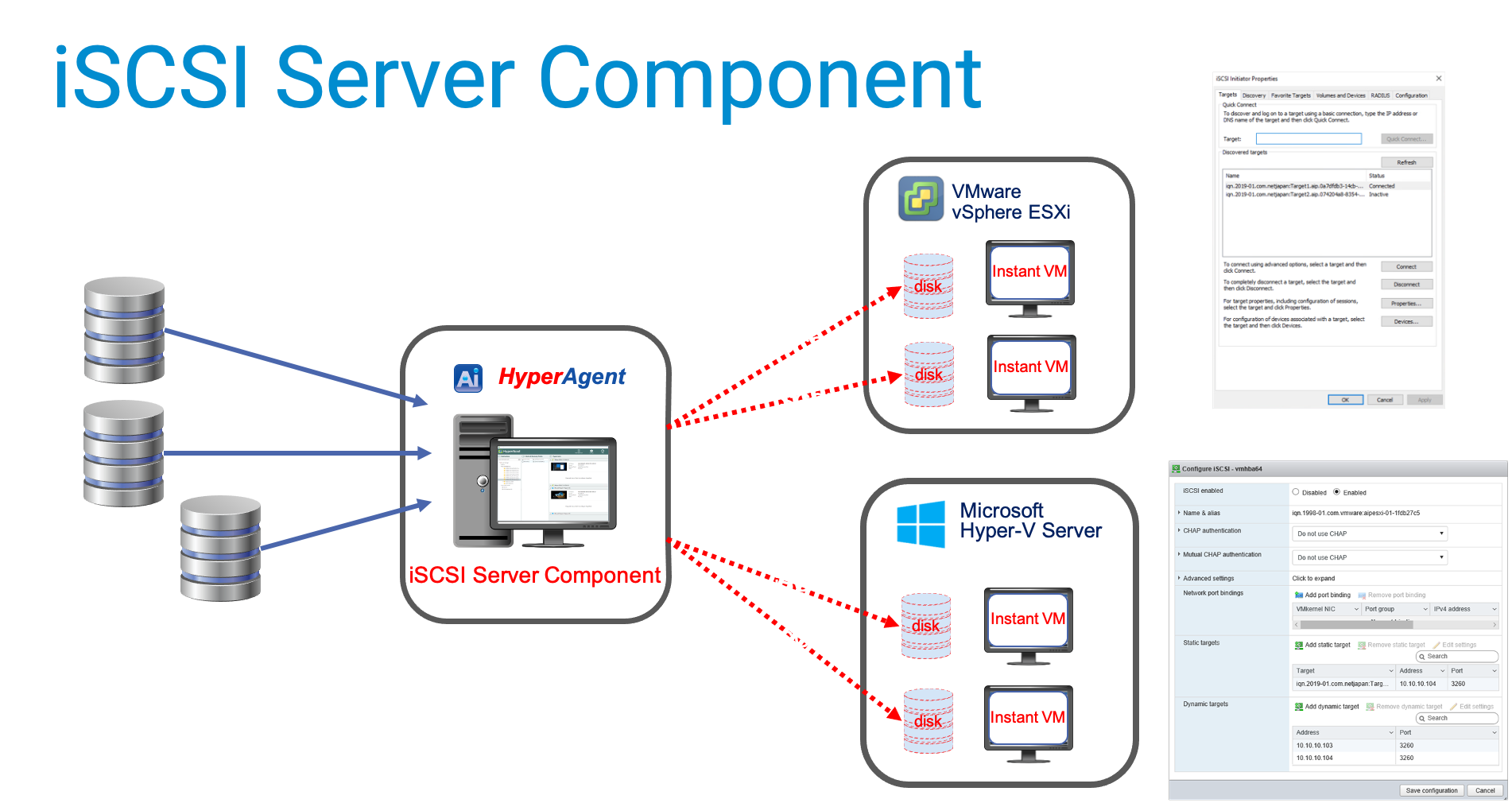
iSCSI Server component in ActiveImage protector

From a commercial product owner’s perspective, iSCSI approach is more promising, with a brighter future and more possibilities.

iSCSI is better match for the task since iSCSI had been designed to provide block devices from day 1.

NFS had originally been designed to share file/folder content over a network, hence requires some extra tweaks to make it suitable.

It gradually loses focus since NFS had never been considered to primarily serve block storage.

If future iterations of well-known or new hypervisors will drop support for NFS I will not be surprised.

Instant VM on KVM using ActiveImage iSCSI

iSCSI vs. NFS – which one is better choice for Instant VM? Read More »

Are your backups safe from Malware?

Recent reports from multiple sources reveal the weight of ransomware attacks has recently skewed towards MSP networks.

Sources confirm in some cases the hacker’s penetration causes disabling backup and disaster recovery (BDR) systems.

Depending on how MSP’s handle end-customer separation from MSP environment – the ransomware can either be propagated to the end-user fleet, or it can be contracted from the end-customer environment and travel across the MSP’s network.

On the top of commonly suggested steps to prevent ransomware attacks or to reduce their consequences, ActiveImage Protector offers a few features, some of them are unique:

1. ActiveVisor – ActiveImage Protector site management suite – can alert about an absence of backups against a defined threshold


This type of alert is preferred since the backup schedules can be altered silently, disabling normal “success/failure” routine.

2. ActiveImage Protector HyperAgent – crucial component of ActiveImage Protector Virtual Edition – allows full separation between MSP and end-customer environments.

ActiveImage Protector HyperAgent component is designed to backup virtual machines from outside, i.e. in “agentless” fashion on hypervisor level, so the end-users environment might have no visible or sensible traces of ActiveImage.

Moreover, the end-users space can/will be completely isolated from MSP, even on a network level since ActiveImage Protector HyperAgent is not required to run within the end-customer network segment.

3. Finally – ActiveImage Protector offers a unique way to avoid/reduce ransomware damage to backup destinations and their content (i.e. backups themselves). This feature is called “Destination Isolation Options” but is also known as “Anti-Malware options”.

These options are present during a backup configuration and go as follows:

  • Un-assign drive letter from Local Hard Disk post backup – if a backup resides on local disk space, the destination disk’s letter will be unassigned as soon as the backup completes. As a result, the destination disk will not be visible to all other programs and may skip being examined by ransomware as a potential target. ActiveImage Protector automatically reassigns the drive letter right before the next scheduled backup attempts and unassigns the letter again after backup is completed.
  • Make destination Local Disk Offline post backup – the same as #1 option with one difference; destination disk will be marked as Offline. ActiveImage brings the destination disk Online right before the next scheduled backup attempt and takes it Offline right after backup is completed.

Both above options can be combined or used separately; both are relevant to the cases where the destination is an internal disk other than a source of backup.

  • Eject destination Removable USB Hard disk post backup – in case of externally connected USB used as a backup destination the backup will finish with disconnecting this USB drive from the OS. Next scheduled backup attempt to this destination will fail unless the USB drive is reconnected (human interaction will always be required for that). At the surface, this option may seem to be harsh and unattractive; however, on a scale of anti-malware means, this has more substantial protection score and has its place in the scope of use cases.
  • Disable destination Network Connection post backup – relevant with the destination being a network share. A separate (dedicated to backups) NIC has to be allocated with this option. It’s probably common sense to put this NIC on a different subnet from the production subnet. The NIC will be disabled as soon as the subnet backup completes. ActiveImage Protector will enable it right before the next scheduled backup attempt and will again disable it right after backup finishes.

All the above-listed means by ActiveImageProtector complement the mainstream cybersecurity suggested steps to protect the MSP/end-users environment from hacking/malware attacks such as:

  • Embrace Multi-Factor Authentication – Activate two-factor/multi-factor authentication (2FA/MFA) on all systems — including MSP software platforms, administrator systems and end-user systems wherever possible;
  • Configure BDR and Security System Alerts (such as #2, ActiveVisor alert configurations);
  • Embrace an MSP Documentation Platform to document your data protection and cybersecurity processes, disaster recovery plans, etc.;
  • Stay Informed on security threats;
  • Build Your Long-term Plan to mitigate risk;
  • Boost MSP Employee and End-user cybersecurity Awareness;
  • Integrate vendor Wisely into your cybersecurity plan/layout (for example use the above-listed features as part of your actions);
  • Partner with MSSPs (Managed Cybersecurity Service Providers);
  • Extend to attend major cybersecurity events — notably RSA Conference, Black Hat and Amazon AWS re Inforce.

Are your backups safe from Malware? Read More »

Scroll to Top