Sergey Zimin

Backup scheduling best practises to ensure availability

Imagine a scale where the two endpoints represent two extreme data protection policies.

The endpoint on the left-hand side of the scale is marked, “good backup of the system when it was configured and released into Production” (i.e. “day-zero backup”).

The endpoint on the right-hand side of the scale is marked, “real-time mirroring/replication”.

These two marks represent two extreme cases in backup scheduling:

“real-time mirror/replica” actually assumes there is no need for a backup schedule; the backup happens in real-time, all the time.,

In practice, most businesses will not choose real-time replication of their data; and will instead put in place a backup schedule to protect data created after the initial “day-zero” backup.

Several factors must be considered before implementing the correct backup policies to meet the required (RPO) Recovery Point Objectives.

·       How often we need to backup an entire system, disks/volumes, data and databases, AD/configuration, network files, other critical systems and data, user’s data?

·       What each backup software is capable of, what type of data the software can see and can backup separately from the rest?

Some of the vendors offer a wide variety of options such as backup up entire systems, separate disks/volumes, files/folders, databases, and mail applications.

Other vendors focus on machine/disks/volumes level and include the ability to recover the rest of the above-listed items from this level backups.

Regarding the frequency of backups, a surface conclusion is the more frequently we backup the data, the more granularity we have in the sense of possible recovery points.

        Frequency of backups – What impact on production resources?

        Any backup in progress must not cause degradation or failure to any production activity/process.

Most of the backup vendors provide means to limit resource consumption (CPU, network bandwidth) by backup processes.

        Nevertheless, lowering resource consumption causes a longer time for the backup task to finish. This may contradict with other critical requirements.

Moreover, some aspects of backup tasks might not be easy to control/restrict in sense of CPU/RAM/disk I/O consumption. For example, VSS snapshots which are widely used by all vendors on Windows systems and triggered at the beginning of each backup task.

        Impact on Storage Resources – The more frequently the backup task occurs, the more often new backup data hits the destination storage, more data is accumulated, consuming more storage. The storage maximum capacity can be reached sooner.

To address this side-effect most of the backup vendors offer “Retention Policy” – a software means to get rid of the older backups so the storage will longer before it is 100% consumed.

In addition to retention policies, some of the backup vendors provide software components/tools to replicate backups offsite; where the Retention Policy restrictions can be more modest and data can be accommodated in larger sizes.

The backup scheduling topic goes hand-to-hand with other topics like “Full vs Incremental vs Differential: Comparing Backup Types”, “3-2-1 Backup Strategy”. Please check out our other blog articles.

In short: 

A Full backup set represents a full set of data which had been intended to be protected.

A Differential backup contains only changes compared with Full backup.

An Incremental backup contains only changes compared with the last previously created backup (which might be Full, Differential, or Incremental).

Obviously, a Full backup consumes the most storage space of all three backup types.

A Differential backup can be small in size if created soon after Full but may also be of significant size if taken a few weeks/months after the last full backup, since it’s content will always differ from the full backup and all changes can take up a lot of space.

An Incremental backup is the ‘smallest’ of the three backup types. The only downside – it always depends on the previously created backup. So, if you build a long chain of Increments – you are potentially reducing the reliability of the backups.

The solution to this “long-incremental” chain is the real need to occasionally create a new full backup.

Now with this “occasionally” remark, we enter the real world where we face limitations of storage, network bandwidth and so on. We may realize that “full backup occasionally” requirement is easy to digest but might not be so easy to follow.

The concept of “Incremental Forever” comes to the rescue in such cases. This concept had been mastered especially around the cases with scarce/limited network resources, where the full backup transfer would take days and weeks to complete.

“Incremental Forever” offers to create a full backup only once and defines Incremental backups for the rest of the time.

To avoid the “long-incremental chain” reliability issue, backup vendors offer smart methods to consolidate the multiple Increments into a single file so the number of items in the chain can be reduced and dynamically controlled.

Scheduled Boot Checks to check the health of backup sets is offered by vendors along with components/tools to run ad-hoc or scheduled Boot Checks – attempts to boot a temporary VM directly from the latest item of a backup chain.

If such attempt succeeds – the attempt is marked successful and indicates the good health of the backup chain. A failure of such a test is a clear indication to a backup operator: it’s time to create a new Full backup.

Backup scheduling best practises to ensure availability Read More »

iSCSI vs. NFS – which one is better choice for Instant VM?

iSCSI vs. NFS – which one is better choice for Instant VM?

Occasionally I come across a discussion about which approach is better to serve backup data to an Instant VM – iSCSI or NFS, or any others?

Those who advocate NFS quite often say that if the target hypervisor supports NFS storage and the vendor has done a good job providing backup data as NFS storage – there is no difference.

From a user perspective, both approaches give the same VM as a result; with the same potential bottlenecks such as CPU, RAM, bandwidth etc.

Citrix, RedHat Virtualisation, KVM, MS Hyper-V, VMware ESXi – all of them can work with NFS storage today.

Why do some vendors stick to NFS while others offer iSCSI?

NFS (Network File System) has been around since 1984 and was originally developed by Sun Microsystems as a distributed file system protocol.

iSCSI (Internet Small Computer Systems Interface) was born in 2003 to provide block-level access to storage devices by carrying SCSI commands over a TCP/IP network.

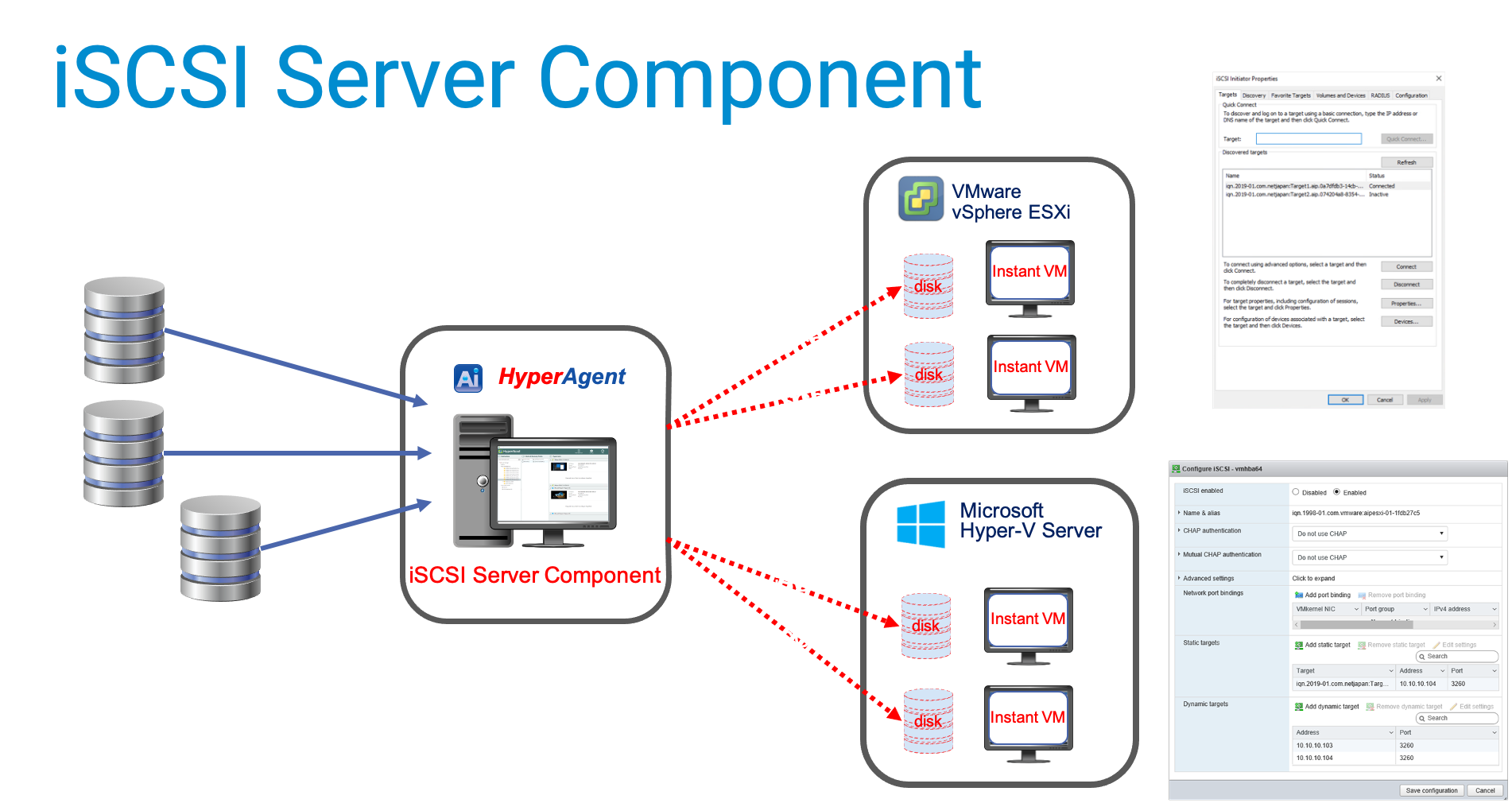
“Block-level access to storage” is the one we are after, the one we need to serve to an Instant VM (a VM which runs directly from a data set, in our case directly from backup).

“SCSI commands over a TCP/IP network” – yeah, this is exactly what we need!

Anyone developing an “Instant-VM” solution between 1984 and 2003 really had no choice but to employ an NFS protocol.

VMware is probably the best but not the only example.

In other words, the sooner an “Instant-VM” had emerged – the greater the likelihood that this solution would be based on NFS.

So, NFS is not a real advantage, but rather an indication of when the decision had been made.

iSCSI has broader coverage across hypervisors and has in fact been one of the firm standard means to provide storage devices for VMs; reaching the widest variety of systems as possible with the best API support.

Taking the iSCSI approach means less hassle in the long run.

For others, maintaining the NFS approach may mean increasing investment in development with time or switching to iSCSI to stay relevant to targeted environments.

iSCSI protocol remains actively maintained/enhanced/enforced by standards, while NFS went off focus a while ago due to a lack of in-demand features in areas where it shined earlier such as distributed file system.

Some of iSCSI’s clear advantages over NFS and others:

1. It is supported in almost every hypervisor and OS out there today.

2. Mature technology with clear up-to-date standards

3. Works across the network very well, even in relatively high latency/low bandwidth scenarios

4. Great performance.

5. Removes reliance on kernel drivers

6. For a vendor employing iSCSI approach it often means one component to serve all products needs

iSCSI Server component in ActiveImage protector

From a commercial product owner’s perspective, iSCSI approach is more promising, with a brighter future and more possibilities.

iSCSI is better match for the task since iSCSI had been designed to provide block devices from day 1.

NFS had originally been designed to share file/folder content over a network, hence requires some extra tweaks to make it suitable.

It gradually loses focus since NFS had never been considered to primarily serve block storage.

If future iterations of well-known or new hypervisors will drop support for NFS I will not be surprised.

Instant VM on KVM using ActiveImage iSCSI

iSCSI vs. NFS – which one is better choice for Instant VM? Read More »

Are your backups safe from Malware?

Recent reports from multiple sources reveal the weight of ransomware attacks has recently skewed towards MSP networks.

Sources confirm in some cases the hacker’s penetration causes disabling backup and disaster recovery (BDR) systems.

Depending on how MSP’s handle end-customer separation from MSP environment – the ransomware can either be propagated to the end-user fleet, or it can be contracted from the end-customer environment and travel across the MSP’s network.

On the top of commonly suggested steps to prevent ransomware attacks or to reduce their consequences, ActiveImage Protector offers a few features, some of them are unique:

1. ActiveVisor – ActiveImage Protector site management suite – can alert about an absence of backups against a defined threshold


This type of alert is preferred since the backup schedules can be altered silently, disabling normal “success/failure” routine.

2. ActiveImage Protector HyperAgent – crucial component of ActiveImage Protector Virtual Edition – allows full separation between MSP and end-customer environments.

ActiveImage Protector HyperAgent component is designed to backup virtual machines from outside, i.e. in “agentless” fashion on hypervisor level, so the end-users environment might have no visible or sensible traces of ActiveImage.

Moreover, the end-users space can/will be completely isolated from MSP, even on a network level since ActiveImage Protector HyperAgent is not required to run within the end-customer network segment.

3. Finally – ActiveImage Protector offers a unique way to avoid/reduce ransomware damage to backup destinations and their content (i.e. backups themselves). This feature is called “Destination Isolation Options” but is also known as “Anti-Malware options”.

These options are present during a backup configuration and go as follows:

  • Un-assign drive letter from Local Hard Disk post backup – if a backup resides on local disk space, the destination disk’s letter will be unassigned as soon as the backup completes. As a result, the destination disk will not be visible to all other programs and may skip being examined by ransomware as a potential target. ActiveImage Protector automatically reassigns the drive letter right before the next scheduled backup attempts and unassigns the letter again after backup is completed.
  • Make destination Local Disk Offline post backup – the same as #1 option with one difference; destination disk will be marked as Offline. ActiveImage brings the destination disk Online right before the next scheduled backup attempt and takes it Offline right after backup is completed.

Both above options can be combined or used separately; both are relevant to the cases where the destination is an internal disk other than a source of backup.

  • Eject destination Removable USB Hard disk post backup – in case of externally connected USB used as a backup destination the backup will finish with disconnecting this USB drive from the OS. Next scheduled backup attempt to this destination will fail unless the USB drive is reconnected (human interaction will always be required for that). At the surface, this option may seem to be harsh and unattractive; however, on a scale of anti-malware means, this has more substantial protection score and has its place in the scope of use cases.
  • Disable destination Network Connection post backup – relevant with the destination being a network share. A separate (dedicated to backups) NIC has to be allocated with this option. It’s probably common sense to put this NIC on a different subnet from the production subnet. The NIC will be disabled as soon as the subnet backup completes. ActiveImage Protector will enable it right before the next scheduled backup attempt and will again disable it right after backup finishes.

All the above-listed means by ActiveImageProtector complement the mainstream cybersecurity suggested steps to protect the MSP/end-users environment from hacking/malware attacks such as:

  • Embrace Multi-Factor Authentication – Activate two-factor/multi-factor authentication (2FA/MFA) on all systems — including MSP software platforms, administrator systems and end-user systems wherever possible;
  • Configure BDR and Security System Alerts (such as #2, ActiveVisor alert configurations);
  • Embrace an MSP Documentation Platform to document your data protection and cybersecurity processes, disaster recovery plans, etc.;
  • Stay Informed on security threats;
  • Build Your Long-term Plan to mitigate risk;
  • Boost MSP Employee and End-user cybersecurity Awareness;
  • Integrate vendor Wisely into your cybersecurity plan/layout (for example use the above-listed features as part of your actions);
  • Partner with MSSPs (Managed Cybersecurity Service Providers);
  • Extend to attend major cybersecurity events — notably RSA Conference, Black Hat and Amazon AWS re Inforce.

Are your backups safe from Malware? Read More »

ActiveImage Protector: adding anti-malware Controls

Combat Malware
Combat Malware

Recent reports from multiple sources reveal the weight of ransomware attacks has recently skewed towards MSP networks.

Sources confirm in some cases the hacker’s penetration causes disabling backup and disaster recovery (BDR) systems.

Depending on how MSP’s handle end-customer separation from MSP environment – the ransomware can either be propagated to the end-customer fleet or it can be contracted from end-customer environment and travel across MSP network.

On the top of commonly suggested steps to prevent ransomware attacks or to reduce their consequences ActiveImage Protector offers a few features, some of them are unique:

1. ActiveVisor – ActiveImage Protector site managing suite – can alert about an absence of backups against a defined threshold

This type of alert is preferred since the backup schedules can be altered silently, disabling normal “success/failure” routine.

2. ActiveImage Protector HyperAgent – crucial component of ActiveImage Protector Virtual Edition – allows full separation between MSP and end-customer environments.

ActiveImage Protector HyperAgent component is designed to backup virtual machines from outside, i.e. in “agentless” fashion on hypervisor level, so the end-customer’s environment might have no visible or sensible traces of ActiveImage.

Moreover the end-customer’s space can/will be completely isolated from MSP, even on a network level since ActiveImage Protector HyperAgent is not required to run within end-customer network segment.

3. Finally – ActiveImage Protector offers a unique way to avoid/reduce ransomware damage to backup destinations and their content (i.e. backups themselves). This feature is called “Destination Isolation Options” but is also known as “Anti-Malware options”.

These options are present during a backup configuration and go as following:

  • Un-assign drive letter from Local Hard Disk post backup – if backup is pointed to a local disk space, the destination disk’s letter will be unassigned as soon as the backup completes. As a result, the destination disk will not be visible to all other programs and may skip being examined by ransomware as a potential target. ActiveImage Protector automatically reassign the drive letter right before the next scheduled backup attempts and unassigns the letter again after backup is completed.
  • Make destination Local Disk Offline post backup – the same as #1 option with one difference, destination disk will be marked as Offline. ActiveImage brings the destination disk Online right before the next scheduled backup attempt and takes it Offline right after backup is completed.

Both above options can be combined or used separately, both are relevant to the cases where destination is an internal disk other than source of backup of course.

  • Eject destination Removable USB Hard disk post backup – in case of externally connected USB used as a backup destination the backup will finish with disconnecting this USB drive from the OS. Next scheduled backup attempt to this destination will fail unless the USB drive is reconnected (human interaction will always be required for that). At the surface this option may seem to be harsh and unattractive, however on a scale of anti-malware means this has heavier protection score and has its place in a scope of use cases.
  • Disable destination Network Connection post backuprelevant with destination being a network share. Needless to say, a separate (dedicated to backups) NIC has to be allocated with this option. It’s probably common sense to put this NIC on a different from the production subnet. The NIC will be disabled as soon as backup completes. ActiveImage Protector will enable it right before the next scheduled backup attempt and will again disable it right after backup finishes.

All the above listed means by ActiveImageProtector compliment the mainstream cybersecurity suggested steps to protect the MSP/end-customer’s environment from hacking/malware attacks such as:

  • Embrace Multi-Factor Authentication – Activate two-factor/multi-factor authentication (2FA/MFA) on all systems — including MSP software platforms, administrator systems and end-user systems wherever possible;
  • Configure BDR and Security System Alerts (such as #2, ActiveVisor alert configurations);
  • Embrace an MSP Documentation Platform to document your data protection and cybersecurity processes, disaster recovery plans, etc.;
  • Stay Informed on security threats;
  • Build Your Long-term Plan to mitigate risk;
  • Boost MSP Employee and End-user cybersecurity Awareness;
  • Integrate vendor Wisely into your cybersecurity plan/layout (for example use the above listed features as part of your actions);
  • Partner with MSSPs (Managed CyberSecurity Service Providers);
  • Extend to attend major cybersecurity events — particularly RSA Conference, Black Hat and Amazon AWS re:Inforce.
Combat Malware

ActiveImage Protector: adding anti-malware Controls Read More »

Deduplication: pros, cons, what to look for and what to expect from it.


We will not try to get down to the molecular level. The main intention of this article is to shed some light on deduplication-relevant pros and cons and to broaden view of this topic.

In computing, the simplest and the most effective definition (by Wikipedia) of Data Deduplication goes as “a specialized data compression technique for eliminating duplicate copies of repeating data”.

So, if you poke around the Internet long enough – you see various examples and analogies which would try to help us to understand what’s going on.

One of the examples would compare a book library with a concise deduplicated collection made out of it.

In this deduplicated collection each word would be stored only once with a lot of references made to all places where in the books this word is actually placed.

Another example would compare a house with a set of elements from which this house is built.

In the deduplicated set we would only need x1 instance of each element (brick, hinge, door nub, roof-tile, window’s frame etc.) with a precise list of references where each element goes to (blueprint of the house).

In both above cases we deal with two main portions of deduplicated data –

  1. the main collection of unique items (“one of each”) and
  2. some sort of a list which has all references recorded, i.e. what element of data belongs to what spot in the data set itself (“index” of some kind).

In real life it would also be cool if a size of the index turned to be relatively small compared to a size of unique items collection and a size of the source data.

So, in the book library example, if we changed our design and decided to store only a unique letter in our “unique items collection” – then we would get only the alphabet stored there. But the index list would grow as big as the book library itself.

Not quite practical. The main reason why Deduplication exists is to reduce a storage space consumed.

In binary-based computing, the same problem would be if we decide to store only 1 and 0 into our unique items collection. A size of corresponding index will be times bigger than a size of a source data.

Any way you think about it – the Deduplication design deals with a standard set of challenges:

  1. What size of data block to consider as potential “unique block”?
  2. What size of index will we get and will it be acceptable?
  3. What reduction in size of the data itself will it give us?
  4. What resources will be needed for this data transformation?

In conjunction with “Backup and Recovery” topic, Deduplication is demanded for the same purpose: reduction of storage consumption.

However, this is not the only requirement, and perhaps not the most important one. The requirement #1 in this case is:

  1. How quickly can we retrieve the stored data or any portions of it, what resources do we need for that?

…because the only sane purpose of producing and storing backups is ability to use the stored data when it’s needed, where it’s needed and, in a form, which is needed.

Naturally, on a way of retrieving data from deduplicated collection we need to reconstruct it back to its original form, re-instantiating all references with the corresponding blocks of data. This process is often called “rehydration”.

How quickly? Depends on our design.

Deduplication is classified in many different categories:

  • Software-based vs. hardware-based – “who is responsible for executing deduplication algorithm?”. Hardware deduplication is done by the hardware itself. In other words, any smart algorithms which need to be in place to crunch incoming data need to exist on the hardware level, embedded into hardware components. This would require a significant work around designing the components and a corresponding firmware. Any further enhancements and optimization would be done via releasing firmware updates and/or hardware components.

Hardware deduplication is not uncommon these days, works well… until you run out of space and hit the specs limits of that particular hardware piece, for example storage controller limits in handling specific disk types or capacity. It tends to be priced higher too.

  • Source-side vs. target-side (destination) vs. both – where exactly deduplication algorithm is executed – on the protected machine, on the backup-data receiving side, on both.

This will affect the corresponding side’s resources (CPU, memory, network bandwidth).  This might also cause storage consumption spikes occasionally (with target-side deduplication, when backup data has already arrived but had not been processed yet).

Target-side deduplication had been around for quite a while and up until recent times had been considered as “industry standard”. Why? Due to the most of pure-source-side algorithms being inefficient or overly resource-consuming.

Don’t be surprised to read the typical target-side machine’s specs: yes, this machine has to be Godzilla of computing, capable of not only crunching large amounts of data but perhaps tons of bricks, steel rails and pipes and who knows what else…

A mixed approach – source and target side deduplication combined – had been observed to prevail in recent years. This by itself indicated the main intention with a time to get rid of a heavily-specked receiving backend.

Finally, within last couple of years we see pure-source-side algorithms capable of doing it effectively which lets us think the future is bright ?

  • Global vs. single-source – how many protected machines participate in forming a unique blocks collection.

This will affect a reported ratio number – reduction in storage size consumption. Global deduplication sounds the way to go, many people enjoy it for a while…until the first corruption occurs. Then many of them have been forced to recreate the entire global repository from scratch.

Just because the corrupted block of data had been associated with hundreds of protected machines. Oops!!! “when good Global goes bad”.

Even if everything works as expected – it might not be too easy to retrieve the data in timely manner, especially when the system is busy with accepting and accommodating several incoming streams of backups. And it often happens when you need this data now, immediately, for Disaster Recovery.

Many vendors offer some smarts to replicate the data from one site to another. If data resides in deduplicated repository – it will be rehydrated at the first step, then compared with the destination, then the changes will be calculated and sent over. The same massive resource consumption is expected.

Single-source on the other hand is portable, easily retrieved. The dataset can be copied/pasted to an external media and sent over to a site where a compromised machine is in need of DR. The smarts required: to be able to use left and right mouse buttons.

Replication between sites is easy too with single-source – the same data gets replicated as the one collected from the last backup. No transformation, no calculation, no overhead.

  • Content-agnostic vs. content-aware – this assumes an absence or existence of some intimate knowledge of certain file formats (MS Exchange, SQL, Oracle, Lotus Notes, etc.) by the software which performs deduplication. Such knowledge might increase storage savings but also decreases reliability of recovery process, just another smart component to rely on to rehydrate the data.
  • Inline vs. post-process – just a variation of the question “when does deduplication happen?”. Inline deduplication is designed to handle data before it’s sent to a destination. By doing so the process decreases amount of data being sent, also decreasing resource consumption by the receiving end. If the algorithm is implemented well – the source machine’s resources will not be consumed excessively. Post-process concept is often prerogative of old-fashioned “industry-standard” approach, also can be seeing with hardware-based deduplication. Here the data is sent to the destination as-is, compressed in the best-case scenario. Then the receiving side starts its magic. This approach may impact network bandwidth, requires more storage available on the receiving side, requires uncompromised specs of the hardware to sustain a “data-crunching feast”.

The last few words are to cover what to expect in sense of reduction of storage consumption.

  1. The deduplication ratio greatly depends on a source data type:
DATA TYPE MAX Expected Ratio
Unified virtual environment, core VM’s system 40:1
File & print server(s) 30:1
MS Exchange, SAP HANA 20:1
Oracle RMAN 14:1
CAD/Video/Medical 10:1
Lotus Notes 9:1
TSM 4:1
SQL/Oracle transaction logs 1.5:1
Encrypted data (any) 1:1


  1. Dissimilar data types (mix between any of the above listed types) pointed to the same Global pool will not increase but rather decrease the ratio.
  2. Deduplication ratio after a single backup will resemble the one achieved with a plain compression. The longer backups have been pointed to the same deduplicated collection – the better the ratio becomes. The ratio even with a single source increases dramatically already with the second backup. Hence deduplication shines with a long-term retention policy.
  3. Pay attention to how the ratio is conveyed to you. “10:1” can be described as “90% of savings”. Both are accurate, which one is more appealing?

Conclusion:

10 years from now someone will find this article and will laugh and laugh and laugh…

Because 10 years from now we will probably use much more efficient storage media, something like… I don’t know, maybe some graphene-based, or some other kind of carbon-based, like coal or something…

And who knows, maybe the history will repeat itself and the next generations and civilizations after ours will find large deposits of coal under ground … and will heat their dwellings with it …

I wonder what was stored on a coal which we burn today? Perhaps nothing important, some deduplicated data with “zillions to1” ratio ?

Quiz (if you read the above material):

  • Can Noah’s life-hack with his Ark be considered as deduplication? Why?
  • What deduplication ratio The Initial Singularity had? Where the heck did they hide the index?

Deduplication: pros, cons, what to look for and what to expect from it. Read More »

ActiveImage in SCADA environment

Scada BDR

SCADA (Supervisory Control And Data Acquisition) Systems control the automation in many industries such as Power, Water, Manufacturing, Energy, Mass Transit and more. SCADA systems are computer based, and so even the best system will fail at some point for reasons such as:

  • Hardware Failures (disk failure, power surges, aged equipment, etc).
  • Software Failures (viruses, operating system errors etc).
  • Accidental System Changes.
  • Network Failures
  • Acts of God (fire, flooding, earthquake)

Depending upon the process being controlled, the cost of SCADA system downtime can be astronomical. Rebuilding a SCADA system from scratch, including the operating system, applications, databases and other customized settings is not satisfactory. It is absolutely critical to have a Disaster Recovery plan for all SCADA systems.

Imaging based backup and recovery solutions have proven to be particularly effective for protecting SCADA environments.

ActiveImage Protector takes regular images of the various SCADA computers and stores them in the cloud or on backup disks. An image is a “photo” of every bit of data on the computer’s hard drives which can then be used to precisely restore the computer back to the time when the image was taken.

The images created by ActiveImage Protector are also “Bare Metal Compatible”. Bare metal restoring will restore the actual state of the machine prior to a failure. This means the operating system, applications, databases and other customized settings are all restored to function exactly as they were at the time the backup image was taken. Bare Metal compatibility also means that all this information can be faithfully restored to different computer hardware, such as a spare server or a spare PC.

This “bare metal restore” process also becomes very useful when you want to retire older SCADA system hardware  and move the application to newer hardware.

ActiveImage Protector also lets SCADA users take advantage of Server Virtualisation technology. Virtual servers (and the hosts on which they are running) can be backed up and recovered just as with physical servers.

Virtual ‘standby’ servers may also be created in a Microsoft Hyper-V or VMWare environment. These standby servers can be started within a few minutes; providing business continuity at no additional cost.

ActiveImage caters for the strict security requirements of SCADA environments with military grade encryption and offline activation.

Offline activation permits administrators to manage all aspects of backup and recovery without ever requiring an internet connection. For larger environments, ActiveImage provides the ability for customers to install their own Licensing Server.

So, in summary, if you have SCADA Systems in your workplace, or have customers with SCADA systems – imaging based backup and recovery solutions such as ActiveImage provide a reliable, flexible and simple means of minimizing downtime.

ActiveImage in SCADA environment Read More »

Are deduplicated backups the way to faster recovery times?

Deduplication has been around for some time now, but may still not be fully understood for its variety of properties.

The technology, sometimes referred to as data deduping or data dedupe, is essentially a method of space-saving and works by dividing data into segments or chunks. These segments are then evaluated for their similarities and if two segments are deemed to be the same, one will be deleted and the other will be stored. New segments of data are also stored and will be compared to other segments in the future.

This method of backing up a server massively saves space, especially to avoid multiple copies of the same file occuring after every full backup or new copies of the same information being made during an incremental backup when there is a limited amount of new information that needs to be stored.

Deduplication is different from compression in that compresson you have to do manually to specific files, whereas deduplication happens to all files that are being backed up.

It has been hailed as a way to eliminate redundant data, assist in optimising IT departments’ backup environments, reduce costs and, perhaps the most important aspect, recover data faster. Deduplication can have enormous impacts on a company’s disaster recovery and data storage space costs, since deduplication data ratios can range from anything between 3:1 to 200:1 and more.

Companies that tend to do more frequent full backups normally have higher ratios. Generally, space savings in primary storage range between 50-60% or more for typical data, and as much as 90% or more for things like virtual desktop images.

However, with its pros, deduplication has some cons that does not make it the all round solution to disaster recovery issues, such as fast recovery. The dedupe process can create complexity and overhead, which defeats the purpose of using the dedupe process for faster recovery.

There is also an increase in the risk of data corruption, if anything were to go wrong in the process. For example, if one piece of information goes bad, all the segments of information that are linked/referred to it will go bad too. This is why it is important to invest in an additional backup when using the deduplication process, and for some companies it may not be worth the trouble.

Another drawback for some companies would be the need for the metadata of each segment in a deduplication system to be maintained and for a filing system to be managed to ensure the data is stored and identified correctly. This may persuade companies not to implement a deduplication process as they may not be able to afford the man hours or resources needed to maintain such a system.

ActiveImage has a tested and proven deduplication method that provides all of the positive with state-of-the-art deduplication with mitigated risks of data corruption or recovery speed concerns. In fact you can check out ActiveImage’s backup speed industry comparisons with solutions such as ShadowProtect (from StorageCraft), Arcserve, Veritas and Acronis.

Depending on your business, data deduping may be the best choice for you. Results vary and you can not say it will work for you since it works for your neighbour or competitor. Different methods and processes work for different forms of data and behaviour patterns. If a company has mainly dissimilar data, deduplication is not worth investing in, but it would work wonders for a company that deals with comparable data.

Results are highly variable depending on the type of data and the number of duplicate segments in the data. Therefore, it is best to perform a full concept test before you commit to deduplication or any other backup strategy.

Are deduplicated backups the way to faster recovery times? Read More »

“3-2-1 rule” of backups in the modern world

When looking for the best backup option for your business, you may come across something known as the 3-2-1 rule. This rule outlines three key steps that should be taken to ensure sufficient backup precautions for your business.

What does 3-2-1 stand for?
The rule states that a business should have 3 copies of its data, of which 2 copies should be stored locally through external storage and through other devices, and 1 copy should be stored remotely, for example, on the Cloud.

Why use the 3-2-1 rule?
Although the rule has been around for many years, it has not become dated, and is still considered the perfect approach to backup strategies. Regardless of what happens, there will always be a copy of the data for the business to rely on, which ensures business continuity. The rule makes sure there can be no single point of failure and that even the backup is backed up.

The strategy has the best of both worlds, as an onsite backup can have your business up and running in no time, whereas an offsite backup makes sure that if a major disaster were to happen, such as a fire, flood or even a burglary, and the onsite backups were lost, there would still be a copy.

The proof is in the Mathematics (example)
Statistically why the 3-2-1 rule decreases the chances of you losing valuable data: If you have a 1 in 100 chance of losing data, but you had a second device with the same odds, then your chance of failure and data loss is 1 in 10 000 (1/100 x 1/100). Additionally, if you had a third storage device or platform with the same odds, the chance of losing data drops even more drastically to a 1 in 1 000 000 chance (1/10 000 x 1/100)!

Therefore, if you think you are sufficiently protected from data loss by two copies, you only stand to gain from a third, which significantly improves your chances of restoring all your data. The 3-2-1 rule is not called the golden rule for nothing!

How to implement the rule with today’s technology:
The 3-2-1 rule is simple and the best way to implement it is to keep it that way. To establish your three copies leave the original data on your internal storage and make two external copies on two different mediums, for example a CD or external hard drive. Here is where traditional methods of recording data on tape should not be sneered at, as they are still effective measures of storing data when part of a well rounded backup plan.

The different mediums or devices on which you store your data externally can also be put in two seperate local locations to decrease the risk of an accident getting rid of both copies.

The third copy must then be stored completely off site, meaning a different city or even a different country. This has become increasingly easier to do as there are an ever increasing number of Cloud vendors that offer Public and Private Cloud solutions that can tie in the 3-2-1 rule into your backup plan, and all you need is network access. Virtual machine replication is also another way modern technology has changed the way a business can plan their backup strategy and make identical copies of information to facilitate the rule.

However, if you do not have the resources or budget to get your data on the Cloud, you can use traditional methods of storage and store the third copy on an external device, which is kept in an offsite storage locker.

Another great feature is that businesses can apply this rule to any data stored on physical hardware, virtual machines or on a provider’s infrastructure, it works every time for any type of data.

Don’t settle for second best! The 3-2-1 rule is a tried and tested strategy, so when choosing a plan for your business, ask your provider or vendor about whether the options they are offering are 3-2-1 compliant.

“3-2-1 rule” of backups in the modern world Read More »

Public Clouds: Threat or blessing for backup and recovery?

More and more businesses are using the Cloud as a work space, and although the Public Cloud is not lacking in benefits, one can not say it is the Fort Knox of platforms when it comes to data protection.

It is easy to see the appeal of using the Cloud to store and manage data as it is cost effective, easy and quick to set up, requires no maintenance or does it require a business to become entangled in long term contracts, it provides high flexibility without redundancy and takes a business global in minutes, among other benefits.

Therefore, it is no surprise that last year, RightScale revealed in their sixth annual State of the Cloud Survey that companies typically run 79% of their workload on the Cloud (41% in the public cloud and 38% in the private cloud). Enterprises run 75% of workloads on the Cloud (43% private and 32% public). Small to medium businesses run 83% of their workloads in the Cloud (50% public and 33% private). The survey was compiled using information that was collected from 1002 IT professionals on their use of Cloud infrastructure

With such a high amount of information and data being processed through the Cloud, companies, businesses and enterprises alike should be concerned about the security of their data. It is a mistake to take the benefits of the Cloud as a foolproof strategy to protect your data and not follow up with data protection that can keep up with the Cloud migration.

Here are five common reasons why the Public Cloud may not be as secure as you may think, and why you should still implement a BDR strategy:

Due to the multitenancy of public cloud platforms, private information is at risk of leaking to a ‘neighbouring tenant’, that shares the same computing resources.
You may still be at risk, therefore, it is important to know what virtualization tools your vendor is running to prevent yourself from becoming a victim of virtual exploits.
The no maintenance benefit can be great, but it also means you have limited control and do not have any choice with regards to any small or big changes made to the software or hardware as it is owned by the Public Cloud. This also applies to authentication, authorisation and accessing processes.
Service interruptions do happen even though a vendor may reassure you that they have fantastic fault tolerance. Availability can still be an issue and opens up the risk of loss of data.

Cloud vendors are known to put clauses in their agreements that changes the ownership of the data over to them. This grants them greater legal protection should something happen but also allows vendors to search and mine their client’s information, sometimes for a profit.

The Public Cloud can be a blessing and does pose its threats, however, the biggest threat is not having a data protection strategy that works with your Cloud services. Using the Public Cloud is not a sufficient backup and disaster recovery plan, as history shows that the redundancy infrastructure used by Cloud vendors can fail. For example, in 2015 Google lost some of their client’s data.

Another reason why a sufficient BDR strategy is key is if a business wants to efficiently implement ‘Bring your own Device’ strategies in the workplace. Cloud services successfully allow for businesses to implement ‘BYOD’ strategies, however, these devices have higher specs than those of the company’s devices and the security and protection needed to safeguard a company’s data on these devices can be overlooked. This increases the risk of the data ending up in the wrong hands.

This is the reason why more and more companies are creating BDR solutions for hybrid and multi-platform cloud services, which require a different approach then traditional solutions as there are different risks involved.

A BDR solution that will protect you against the risks opened up by the Cloud should include global data visibility for anywhere, anytime backup; deduplication for the highest Cloud efficiency; universal data portability that enables data recovery, portability and mobility; flexible data protection; and performance at scale.

However, before any decisions are made, the business would have to look at its own IT resources and expertise to determine what will work best. A comprehensive internal audit may be the solution to discover what a business has the capacity for and what it can afford.

Public Clouds: Threat or blessing for backup and recovery? Read More »

The importance of offsite backups for DR, and how to do it cost effectively

Everyone knows backing up company information is crucial to the companies continuity, and it can be convenient to have a local backup on hand to restore the system once an attack or failure has happened. However, one backup is not enough, especially if it is an onsite backup.

Having an offsite backups might be the wisest decision you make as part of your backup and disaster recovery plan, because if there is a fire, flood, natural disaster or even a burglary, you can rest knowing your data has not been lost and is stored safely in a completely separate location to your home or office.

An offsite backup makes sure there is no single point of failure and there are many ways in which your data can be stored remotely. Companies can use internet backup services which automatically uploads copies of your data to a remote server or public and private cloud services. Another way is using physical devices, such as an external hard drive, on which the data is stored, and then the hard drive is keep in a remote location and updated every week or month.

Although ensuring your data is safe should be your first priority, an offsite backup should not make you break the bank. In fact, there are many ways in which offsite backups can be created that can suit your business in different ways. Yet, which is the most cost effective?

Internet backup services offer security through encrypting your data files, unlimited storage space, automatic updates, ways to customise your package, easy restore and universal access so you can work anywhere. Cloud services offer much of the same as it promises to be secure and maintained, with added email or phone 24 hour support from a team of IT professionals should anything go wrong. For all the above reasons, Cloud and internet services do seem the most cost effective options when you consider the number of people who need to be paid, the resources, running the servers and the facilities that would need to be rented or bought if a company had to facilitate the whole process by themselves.

The last method, of storing data on a physical device is simple if the person in charge of the backup knows how to backup the system sufficiently, however, it is remembering to backup every week or month that is the biggest flaw of this solution. Although, depending on the distance travelled to retrieve the offsite backup and the time and manpower it takes to regularly update the backup, this may be the most cost effective option, even though it requires more effort to execute.

A smaller company or business may find it easier to buy an external hard drive and backup their system on a scheduled basis, but medium to larger businesses will not find a more cost effective solution than the Cloud at this time. The Cloud erases the risk of forgetting to do manual backups as it will automatically backup data on a regular basis, install updates and take care of regular maintenance.

Cloud computing generally runs a company more efficiently as the business would also be able to scale up or down on virtual servers so that the business is only paying for what they are using.

Furthermore, Cloud computing is also a ‘greener’ way to operate. Large data centers do consume a lot of power but they are also preventing many companies from needing their own great power consuming in-house data centres, which cost the individual company greatly.

When it comes to making the final choice, it is up to your businesses needs and how the business operates the most efficiently that will mainly determine what option is the best for the continuity of the business.

The importance of offsite backups for DR, and how to do it cost effectively Read More »

Scroll to Top